
What is an XML sitemap?
An XML sitemap is a plain text file that lists the pages of your website for search engines. This guide explains how the file is built, what each tag does and which ones Google and Bing actually take into account.
A list of URLs written for machines
A sitemap is not a page for your visitors. It is a file, usually called sitemap.xml and placed at the root of the website, that search engine crawlers download and read. Inside, every page you want indexed appears once, with its full address. Crawlers still discover most pages by following links, but the sitemap gives them the complete list in one request, including pages that are poorly linked or that were published only a few minutes ago.
Google introduced the format in 2005, and in 2006 Google, Yahoo and Microsoft agreed to support it jointly on sitemaps.org. It has barely changed since, which is good news: a sitemap written today with the basic tags is read by every major search engine without any adjustment.
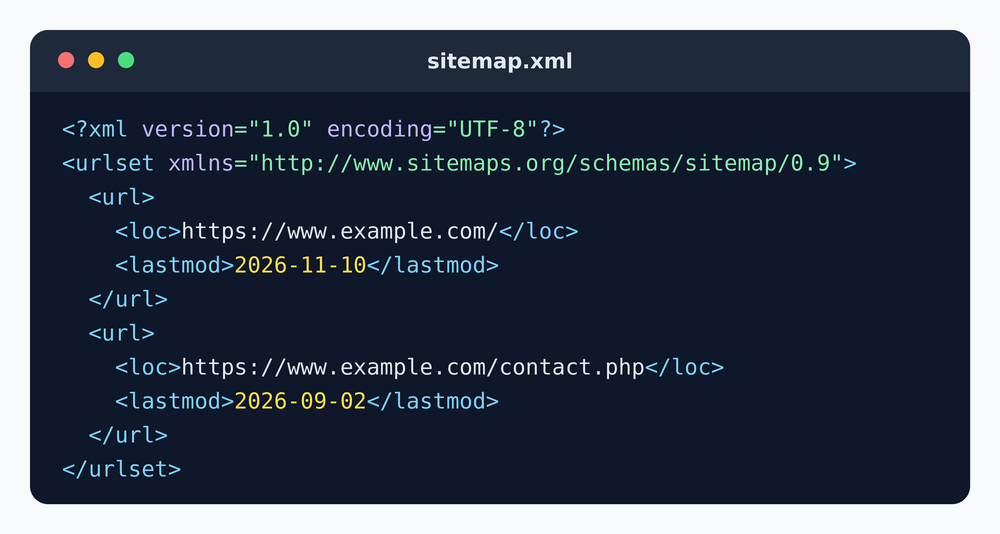
The structure of the file
A sitemap is a small XML document. It always follows the same skeleton:
<?xml version="1.0" encoding="UTF-8"?>
<urlset xmlns="http://www.sitemaps.org/schemas/sitemap/0.9">
  <url>
    <loc>https://www.example.com/</loc>
    <lastmod>2026-11-10</lastmod>
  </url>
  <url>
    <loc>https://www.example.com/contact.php</loc>
  </url>
</urlset>- The XML declaration on the first line states the XML version and the encoding. The file must be saved in UTF-8.
- <urlset> wraps the whole list and declares the sitemap namespace. Without the
xmlnsattribute, some validators reject the file. - <url> opens the entry for one page. There is one block per URL.
- <loc> holds the full address of the page, protocol included (
https://). It is the only tag that is required.
Optional tags, and which ones still matter
| Tag | What it says | How search engines use it |
|---|---|---|
<loc> | The address of the page | Required, read by every engine |
<lastmod> | Date of the last significant change | Used by Google and Bing, as long as the dates are reliable |
<changefreq> | How often the page is expected to change | Ignored by Google |
<priority> | Relative importance from 0.0 to 1.0 | Ignored by Google |
The lastmod date uses the W3C format: either a simple date such as 2026-11-10, or a date with time and time zone such as 2026-11-10T14:30:00+01:00. Only update it when the content of the page really changes. A site that sets every date to today on every build teaches search engines to stop trusting its dates.
Rules that make a sitemap valid
- Absolute URLs only. Write
https://www.example.com/page.php, never/page.php. - One version of your domain. If your site lives on
https://www., every URL in the file must use exactly that form. - Escaped special characters. An ampersand in a URL must be written
&. The same goes for<,>and quotes. - Size limits. One file can hold up to 50,000 URLs and weigh up to 50 MB uncompressed. Beyond that, split it and use a sitemap index.
- Location. Under the protocol, a sitemap placed in a folder can only list URLs from that folder. Put it at the root and it can cover the whole site.
Other kinds of sitemaps
The classic XML sitemap lists web pages, but the protocol has extensions. Image sitemaps add <image:image> tags to help images get found. Video sitemaps describe video content with a title, a thumbnail and a duration. News sitemaps are reserved for publishers in Google News and only list recent articles. Search engines also accept a text sitemap: a .txt file with one URL per line, and nothing else.
Do not confuse any of these with an HTML sitemap, which is an ordinary page of links written for human visitors. It can help navigation on a large site, but it does not replace the XML file.
Do you really need one?
A small site with a clear menu where every page is two clicks from the home page will usually be indexed without a sitemap. The file becomes really useful when the site is large, when it publishes often, when some pages are only reachable through a search form or a filter, or when the site is new and has few links pointing to it. In every case, a sitemap costs nothing and cannot hurt, as long as it only lists pages you actually want to see in search results.
The quickest way to get a valid file is to let a crawler build it for you. sitemapauto.com follows your internal links, keeps only the pages that answer correctly, and gives you a ready-to-upload sitemap.xml.
Frequently asked questions
Is an XML sitemap required for SEO?
No. Search engines can index a site without one. A sitemap makes discovery faster and more complete, which matters most for large, new or frequently updated sites.
Does the file have to be called sitemap.xml?
No, any name works. Using the standard name at the root of the site is simply the easiest choice, and you can declare any other name in robots.txt.
Can I edit a sitemap by hand?
Yes. It is plain text and any code editor will open it. Keep the file in UTF-8 and check that every tag you open is closed.
Does a URL in the sitemap get indexed automatically?
No. The sitemap is a suggestion. Search engines still decide whether each page is worth indexing.
Sitemap guides
Another free tool we built
Validate your whole site, not one page at a time
W3cvalidator.com crawls your website and checks your pages against W3C standards automatically, up to 1,500 pages in a single run. Far faster than validating each page by hand, and a good way to catch the markup errors that hurt accessibility.