
Declaring your sitemap in robots.txt
The robots.txt file is the first thing a crawler reads when it visits your site. One line in it is enough to point every search engine to your sitemap, even those where you never created an account.
What robots.txt is
robots.txt is a text file placed at the root of the domain, at an address such as https://www.example.com/robots.txt. It tells crawlers which parts of the site they may visit. The rules were used informally for decades before being written down as an internet standard, RFC 9309, in 2022. The Sitemap line comes from the sitemaps.org protocol, and Google, Bing, Yandex and the other major engines all read it.
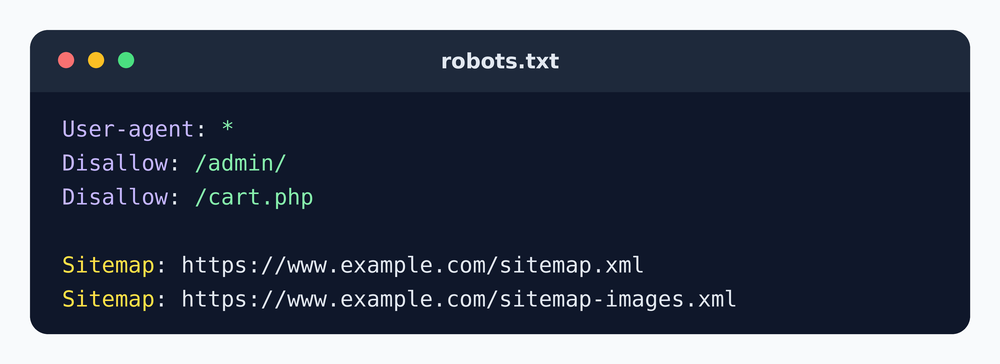
The syntax
User-agent: *
Disallow: /admin/
Sitemap: https://www.example.com/sitemap.xml- The keyword is
Sitemap, followed by a colon and a space. Crawlers do not care about upper or lower case, but the capitalized form is the convention. - The address must be absolute, with the protocol and the domain.
Sitemap: /sitemap.xmlis not valid. - The line is independent of the
User-agentgroups. It applies to every crawler, wherever it sits in the file. Most webmasters put it at the end so it is easy to find. - You can have as many lines as you have sitemaps, or one line that points to a sitemap index.
Examples for common situations
A simple site with one sitemap:
User-agent: *
Allow: /
Sitemap: https://www.example.com/sitemap.xml
A site with separate sitemaps for pages and images:
User-agent: *
Disallow: /cart.php
Sitemap: https://www.example.com/sitemap-pages.xml
Sitemap: https://www.example.com/sitemap-images.xml
A large site with an index file:
User-agent: *
Disallow: /search/
Sitemap: https://www.example.com/sitemap_index.xml
Mistakes that break the link
- Blocking pages you list. If your sitemap contains
/shop/item.phpand robots.txt saysDisallow: /shop/, crawlers receive two opposite instructions. Search Console flags these URLs as blocked by robots.txt. - Blocking the sitemap itself. A rule like
Disallow: /*.xmlstops crawlers from downloading the file you are trying to show them. - Pointing to the wrong domain. After a move from http to https or from a domain without www to one with www, update the line. A Sitemap address that redirects still works in most cases, but a direct address is cleaner.
- Putting robots.txt in a subfolder. Crawlers only look for it at the root of the host. A file at
/blog/robots.txtis never read. - Saving the file in the wrong format. robots.txt must be plain text in UTF-8. A file saved from a word processor can contain invisible characters that break the first line.
Is robots.txt enough, or should I also submit the sitemap?
The two methods complement each other. The robots.txt line works for every crawler, with no account and no verification. Submitting the sitemap in Google Search Console and Bing Webmaster Tools gives you something extra: a report showing whether the file was read, how many URLs were found and which ones caused errors. For a site you care about, do both. Our guide on submitting a sitemap to Google and Bing walks you through the second part.
Checking your robots.txt
Open the address of your robots.txt in a browser and read it line by line. Google Search Console also has a robots.txt report that shows the version Google last downloaded and any line it could not understand. After a change, it can take up to a day before Google uses the new version, because the file is cached.
Frequently asked questions
Where do I put the Sitemap line in robots.txt?
Anywhere in the file. It does not belong to a User-agent group, so placing it at the end is the clearest choice.
Can I list several sitemaps in robots.txt?
Yes, add one Sitemap line per file. For many files, point to a single sitemap index instead.
Can my sitemap be hosted on another domain?
It is possible when both sites are verified in Search Console or when robots.txt on the main domain points to it, but hosting it on the same domain avoids any doubt.
Does robots.txt stop a page from appearing in Google?
Not reliably. It stops crawling, but a blocked page can still be indexed from links. Use a noindex tag to keep a page out of the results.
Sitemap guides
Another free tool we built
Need a strong password?
Createpass.net generates secure passwords online, free and instantly. Create up to 50 passwords at once, choose their length, and decide whether to include digits, letters and special characters - with the option to leave out look-alike characters that are easy to mistype.