
How to submit your sitemap to Google and Bing
Creating a sitemap is half the job. Search engines then need to know where it is. Here is how to upload the file, submit it in Google Search Console and Bing Webmaster Tools, and read the report they give you back.
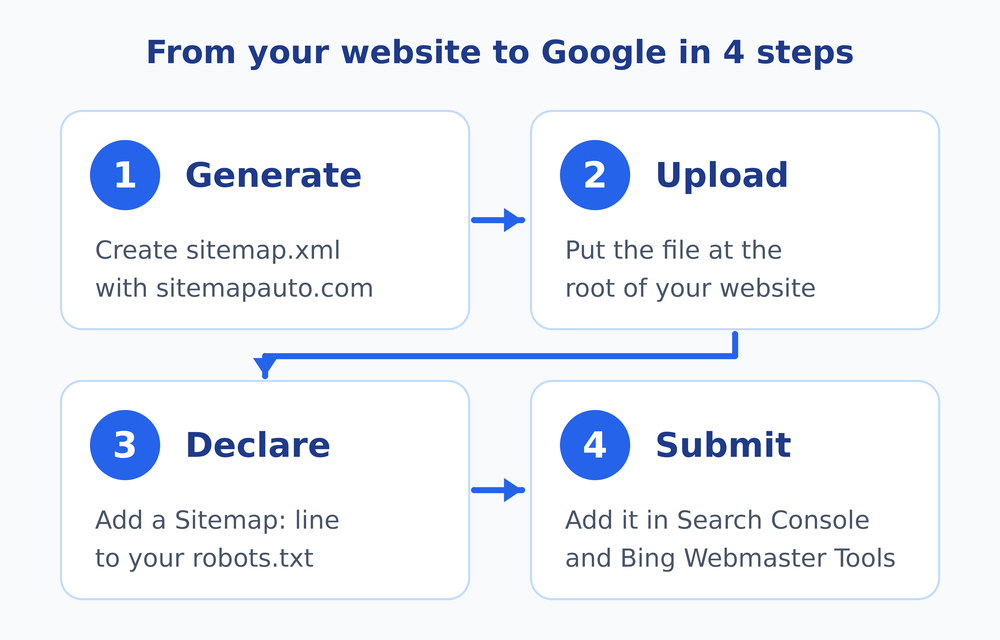
Step 1: upload the file to your website
Once your sitemap.xml is generated, upload it to the root folder of your website, the same folder that contains your home page. With an FTP client such as FileZilla, it is the folder usually called www, public_html or htdocs. When the upload is done, open https://www.yoursite.com/sitemap.xml in your browser. You should see the list of URLs. If you get a 404 error, the file is in the wrong folder.
Step 2: declare it in robots.txt
Add one line to your robots.txt file:
Sitemap: https://www.yoursite.com/sitemap.xmlEvery crawler that reads robots.txt will now find your sitemap, including search engines where you have no account. Our robots.txt guide covers the details.
Step 3: submit it in Google Search Console
- Open Google Search Console and select your property. If your site is not verified yet, Google will ask you to prove you own it, for example with a DNS record or an HTML file.
- Go to Indexing, then Sitemaps in the left menu.
- Type the address of the file in the field "Add a new sitemap". Google pre-fills your domain, so you usually only need to type
sitemap.xml. - Click Submit. The sitemap appears in the list below with a status and the date it was last read.
Google retired its old "ping" address for sitemaps in 2023, so Search Console and robots.txt are now the two ways to tell Google about your file. After that, Google comes back to read it on its own schedule. You do not need to submit it again each time it changes, as long as the address stays the same.
Understanding the status
| Status | What it means | What to do |
|---|---|---|
| Success | Google read the file and found the URLs | Nothing, check the page count from time to time |
| Has errors | The file was read but some entries are invalid | Open the report, fix the listed lines, and generate the file again |
| Couldn't fetch | Google could not download the file | Check the address, the robots.txt rules and your server response |
"Couldn't fetch" often shows up just after a first submission and disappears on its own within a day or two. If it stays, open the sitemap URL in a private browser window. It must answer with a 200 code, without a login, and must not be blocked by a Disallow rule.
Step 4: submit it in Bing Webmaster Tools
Bing powers its own results and those of several other search engines, so it is worth the extra five minutes. Sign in to Bing Webmaster Tools, add your site (Bing can import your sites directly from Google Search Console, which spares you a second verification), then open the Sitemaps section and submit the same address. Bing also supports IndexNow, a protocol that lets your site notify it instantly when a page is added or changed.
After submission: what to watch
- Discovered pages versus indexed pages. Search Console shows how many URLs were found in the sitemap. The page indexing report then tells you how many are actually indexed and why the others are not.
- Pages excluded on purpose. If a URL from your sitemap is reported as "Excluded by noindex tag" or "Page with redirect", remove it from the sitemap. Your file and your pages are sending contradictory signals.
- Freshness. Generate the file again when you add a batch of pages, and upload it under the same name. Search engines will pick up the new version on their next visit.
Before you submit, make sure the file only contains pages that work. sitemapauto.com checks the response of every URL it crawls and leaves broken pages out, so Search Console does not start with a list of errors.
Frequently asked questions
How long does Google take to read a new sitemap?
Usually from a few hours to a few days. The status in Search Console shows the date of the last read.
Do I need to resubmit my sitemap after every change?
No. Upload the new version under the same address. Search engines read submitted sitemaps again on their own.
Why are fewer pages indexed than listed in my sitemap?
Submitting a URL does not guarantee indexing. Duplicate pages, thin content, noindex tags or redirects all keep pages out. The page indexing report in Search Console gives the reason for each one.
Should I submit my sitemap to other search engines?
Declaring it in robots.txt is enough for most of them. Bing deserves a manual submission because it also feeds other search engines.
Sitemap guides
Another free tool we built
Hunt down the broken links on your site
Bye404.org automatically scans a website and reports every dead link and 404 page it finds, broken images included. Broken links frustrate your visitors and waste crawl budget, so they are worth fixing before search engines run into them.